Exploring UCP: Google's Universal Commerce Protocol
Google just released the Universal Commerce Protocol (UCP), and I looked into it to understand what it is and how it works. This post shares my findings, including an overview of the standard, the underlying architecture, and practical, hands-on examples.
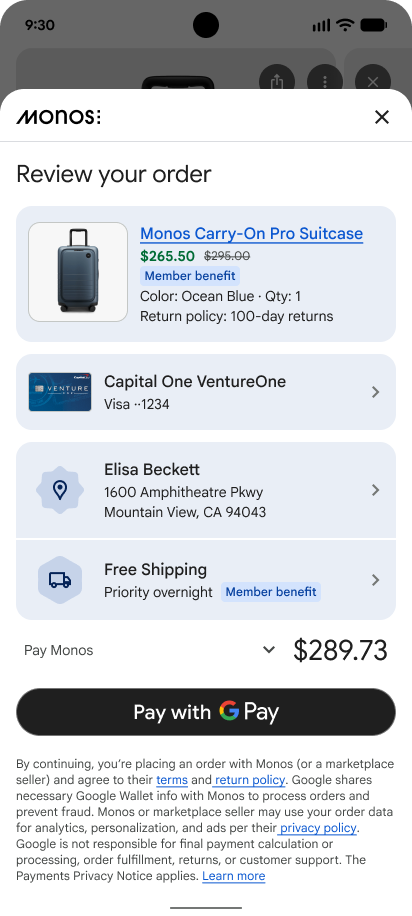
Coding agents are the killer app of AI agents so far. But there’s no guarantee they’ll stay at the top. Another LLM-in-the-loop (aka an agent) contender might be shopping agents or “Agentic Commerce”.
Google released the Universal Commerce Protocol (UCP). The goal is simple: enable shopping in Google’s AI surfaces — as they like to call it — meaning Google AI Mode in Search, the Gemini app, or any future AI platform.
UCP is open.
The Universal Commerce Protocol is designed to be neutral and vendor agnostic, capable of powering agentic commerce on any surface or platform. To provide a concrete example and support seamless adoption, Google has built the first reference implementation of UCP, to power a new buying experience that allows consumers to purchase directly from eligible businesses across Google’s conversational experiences like AI Mode in Search and Gemini.
With Merchant Center, Google scrapes your e-stores, adds products to their catalog, and it then shows up on Search, Maps, YouTube, Shopping, etc. You can, of course, boost this even more with ads.
Now comes the next iteration. You don’t have to search for the product. You tell the LLM to do it for you. But a few challenges remain. The agent also needs to manage your cart. You ask for a product. You specify the quantity. Then you add another product. Then maybe modify that first one. Oof — you’re done with the cart.
Now you need to check out. How about a promo code or discount? And your shipping address? Then there’s the actual payment. Which card? All of this needs to happen securely, of course.
Now imagine the agent having to do this with N e-shops. We need some sort of standard or protocol to do all that commerce — and it should be universal so everybody can adopt it. Oh! Wait! That’s it. We’ll call it the Universal Commerce Protocol.
UCP Overview
Here’s the diagram from the official ucp.dev: 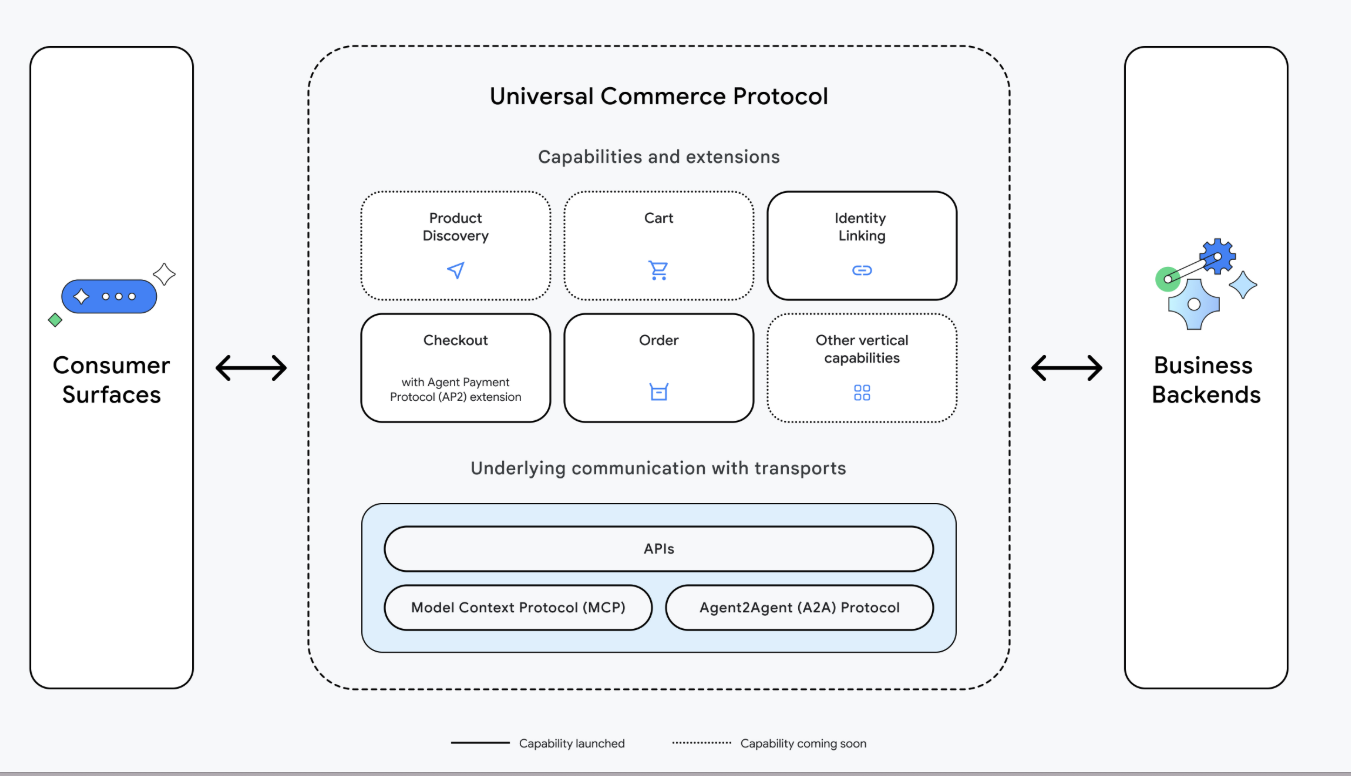
The consumer surface (neat choice of words, “surface”), which is basically AI Search or Gemini for now, is where it starts — where the user initiates a purchase request or intent. Something reasonable, like: “Buy me the most delicious cookie, super affordable, and 0 calories. Make no mistakes.”
The following actors are involved:
- Agent/Platform: that’s the so-called surface — the UI. Could be a mobile app, a website, or something else. It allows the user to discover products and take actions (pick card, address, checkout, etc.).
- Business/Merchant: that’s the seller and Merchant of Record.
- Credentials Provider: system that manages user data (PII, payment info, etc.), e.g. Google Pay or Apple Pay.
- Payment Service Provider (PSP): think Stripe or PayPal. A PSP captures the payment and communicates with the card networks (Visa, Mastercard), which ultimately connect to the banks. Google Pay, for instance, issues a payment token and doesn’t send your actual card numbers (PAN, or Primary Account Number). The card network and bank are aware of that and handle it accordingly.
UCP defines a few “capabilities” in its spec such as Checkout, Order (a confirmed checkout), and Identity Linking — through which the platform (Google) acts as an OAuth client requesting access to do things on the user’s behalf on the merchant’s site.
How the tables have turned! Google is the OAuth client to your authorization server. Having integrated with Google as the auth server a few times makes this funny to me.
As described in the spec, this means allowing the platform (Google) to access personalized offers, manage wishlists, and so on.
As shown in the diagram above, the way the platform shows products and performs checkout and payments can be done using the underlying transports: APIs, MCP, Agent2Agent. The agent has a list of tools, basically, that could use any of these transports.
Handling payment is explained in a guide that’s a bit tough to read. But it says it enables “N-to-N interoperability” — meaning we have N platforms, merchants, and payment providers, and the guide establishes a framework on how to reconcile these. With lots of things needing to happen prior to onboarding: contracts, legal, etc. Fun stuff.
UCP Playground
The Playground on the ucp.dev website is just great. It walks through a complete UCP flow with a nice intuitive UI. Even the demo in the GitHub samples repo is really smooth. Kudos to the people behind it!
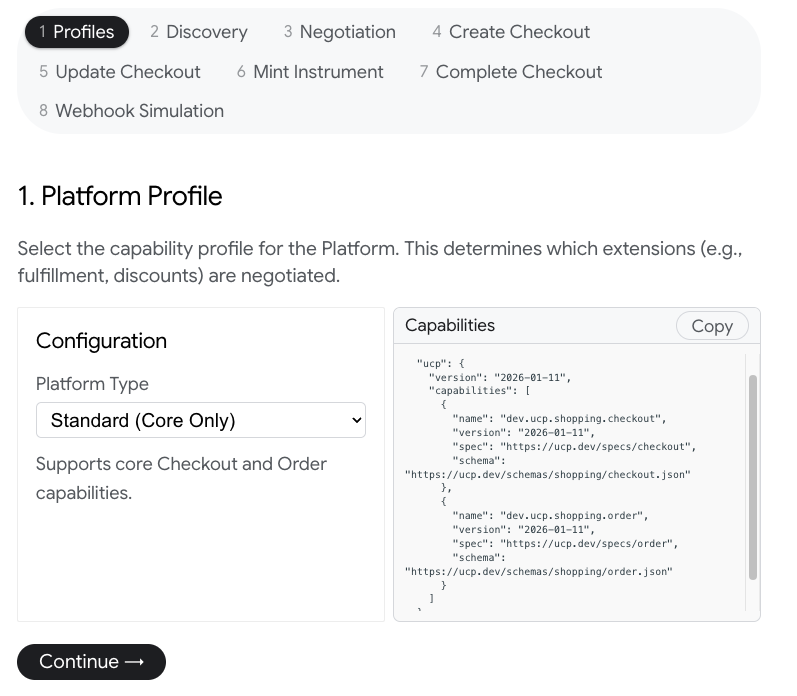
Here are the steps involved in a typical session:
1- Profile: Platform/Agent defines its capabilities according to a predefined UCP schema. In the following, the platform supports Checkout and Order. Other possible ones are Discount, Buyer Consent (e.g. for communications preferences, GDPR, etc.), and so on.
1
2
3
4
5
6
7
8
9
10
11
12
13
14
15
16
17
18
19
{
  "ucp": {
    "version": "2026-01-11",
    "capabilities": [
      {
        "name": "dev.ucp.shopping.checkout",
        "version": "2026-01-11",
        "spec": "https://ucp.dev/specs/checkout",
        "schema": "https://ucp.dev/schemas/shopping/checkout.json"
      },
      {
        "name": "dev.ucp.shopping.order",
        "version": "2026-01-11",
        "spec": "https://ucp.dev/specs/order",
        "schema": "https://ucp.dev/schemas/shopping/order.json"
      }
    ]
  }
}
2- The Business/Merchant exposes their own capabilities in /.well-known/ucp:
1
2
3
4
5
6
7
8
9
10
11
12
13
14
15
16
17
18
19
20
21
22
23
24
25
26
GET /.well-known/ucp HTTP/1.1
Host: business.example.com
Accept: application/json

== Response ==
{
  "ucp": {
    "version": "2026-01-11",
    "capabilities": [
      {
        "name": "dev.ucp.shopping.checkout",
        "version": "2026-01-11",
        "spec": "https://ucp.dev/specs/checkout",
        "schema": "https://ucp.dev/schemas/shopping/checkout.json"
      },
      {
        "name": "dev.ucp.shopping.order",
        "version": "2026-01-11",
        "spec": "https://ucp.dev/specs/order",
        "schema": "https://ucp.dev/schemas/shopping/order.json"
      },
      ...

    ]
  }
}
3- Capability negotiation: the intersection between the two sets of capabilities.
4- Checkout: the user asked for some products that the platform knows the business has, e.g. from the Google Merchant Store. The platform (Gemini or AI Search) presents the products to the user and, if they decide to add them to their cart, a Checkout session is created (notice line items and user info):
1
2
3
4
5
6
7
8
9
10
11
12
13
14
15
16
17
18
19
20
21
22
23
24
25
26
27
28
29
30
31
32
33
34
35
36
37
38
39
40
41
42
43
{
  "line_items": [
    {
      "item": {
        "id": "sku_stickers"
      },
      "quantity": 2
    },
    {
      "item": {
        "id": "sku_mug"
      },
      "quantity": 1
    }
  ],
  "buyer": {},
  "payment": {
    "instruments": [
      {
        "handler_id": "shop_pay",
        "type": "shop_pay",
        "email": "buyer@example.com",
        "id": "instr_sp_1338ef2c-3913-4267-83a2-a84d07d9a6a6"
      }
    ]
  },
  "fulfillment": {
    "methods": [
      {
        "type": "shipping",
        "destinations": [
          {
            "id": "addr_1",
            "street": "123 Main St",
            "city": "Tech City",
            "country": "US",
            "postal_code": "94103"
          }
        ]
      }
    ]
  }
}
If the payload is missing something the business expects (email, address), it can specify that in its response:
1
2
3
4
5
6
7
8
9
10
...
  "messages": [
    {
      "type": "error",
      "code": "missing",
      "path": "$.buyer.email",
      "severity": "requires_buyer_input",
      "content": "Buyer email is required for checkout."
    }
...
5- Update Checkout: the cart or missing info can be added to the checkout session via a PATCH request.
6- Payment: the platform presents payment options to the user (based on the info it got from the discovery phase, in which the business indicated what payment methods it supports). The user validates their payment via Google Pay, Shop Pay, etc. The result of this is a generated token:
1
2
3
4
5
6
7
8
9
10
11
12
13
14
15
16
17
18
19
20
21
{
  "handler_id": "gpay",
  "type": "card",
  "brand": "visa",
  "last_digits": "4242",
  "billing_address": {
    "street_address": "123 Main Street",
    "extended_address": "Suite 400",
    "address_locality": "Charleston",
    "address_region": "SC",
    "postal_code": "29401",
    "address_country": "US",
    "first_name": "Jane",
    "last_name": "Smith"
  },
  "id": "instr_gp_msg_084a3d56-3491-4b5e-ae3e-b1c45b22fa50",
  "credential": {
    "type": "PAYMENT_GATEWAY",
    "token": "gpaytok_576cdc3c-5f6b-44e5-a275-0235e6779b6f"
  }
}
7- Complete Checkout: armed with that precious payment token, the platform issues a final request to complete the checkout. The Business/PSP will verify the validity of that token and, if things look good, the order will be confirmed. The merchant ID and info required to route the payment through the PSP are specified during the discovery phase.
1
2
3
4
5
6
7
8
9
10
11
12
13
14
15
16
17
18
19
20
21
22
23
{
  "payment": {
    "handler_id": "gpay",
    "type": "card",
    "brand": "visa",
    "last_digits": "4242",
    "billing_address": {
      "street_address": "123 Main Street",
      "extended_address": "Suite 400",
      "address_locality": "Charleston",
      "address_region": "SC",
      "postal_code": "29401",
      "address_country": "US",
      "first_name": "Jane",
      "last_name": "Smith"
    },
    "id": "instr_gp_msg_084a3d56-3491-4b5e-ae3e-b1c45b22fa50",
    "credential": {
      "type": "PAYMENT_GATEWAY",
      "token": "gpaytok_576cdc3c-5f6b-44e5-a275-0235e6779b6f"
    }
  }
}
8- Order Webhook: while onboarding (out-of-band and offline, possibly), the platform provides a webhook URL to the business to provide updates regarding the order. When an order status changes, a payload is sent to that endpoint. The payload is signed with a key that’s tied to the business and presented in its UCP discovery profile. This way, the platform is able to verify the integrity of payloads.
1
2
3
4
5
6
7
8
9
10
11
12
13
14
15
16
17
18
19
20
21
22
23
24
25
26
27
28
29
30
31
32
33
34
35
36
37
38
39
40
41
42
43
44
45
46
47
48
49
50
51
52
53
54
55
56
57
58
59
60
61
62
63
64
65
66
67
68
69
70
71
72
73
74
75
76
77
...
merchant.com/orders/ord_5477fb28",
  "line_items": [
    {
      "id": "li_1",
      "item": {
        "id": "sku_stickers",
        "title": "UCP Demo Sticker Pack",
        "price": 599,
        "image_url": "https://example.com/images/stickers.jpg"
      },
      "quantity": {
        "total": 2,
        "fulfilled": 2
      },
      "totals": [
        {
          "type": "subtotal",
          "amount": 1198
        },
        {
          "type": "total",
          "amount": 1198
        }
      ],
      "status": "fulfilled"
    },
    {
      "id": "li_2",
      "item": {
        "id": "sku_mug",
        "title": "UCP Demo Mug",
        "price": 1999,
        "image_url": "https://example.com/images/mug.jpg"
      },
      "quantity": {
        "total": 1,
        "fulfilled": 1
      },
      "totals": [
        {
          "type": "subtotal",
          "amount": 1999
        },
        {
          "type": "total",
          "amount": 1999
        }
      ],
      "status": "fulfilled"
    }
  ],
  "fulfillment": {
    "events": [
      {
        "id": "evt_750a1a92",
        "occurred_at": "2026-01-16T15:45:49.299Z",
        "type": "shipped",
        "line_items": [
          {
            "id": "li_1",
            "quantity": 2
          },
          {
            "id": "li_2",
            "quantity": 1
          }
        ],
        "tracking_number": "1Z999AA10123456784",
        "tracking_url": "https://example-carrier.com/track/1Z999AA10123456784",
        "carrier": "Mock Express",
        "description": "Package handed over to carrier."
      }
    ]
  }

...
And that’s it, boys and girls! The commerce of the future.
UCP Samples Demo
The demo in UCP/samples is really delightful. Demos where you just run a couple of commands and you’re up and running are the best!
1
2
3
4
5
6
7
8
9
10
11
12
13
14
15
git clone https://github.com/Universal-Commerce-Protocol/samples.git universal-commerce-protocol-samples
cd universal-commerce-protocol-samples

## business server
cd a2a/business_agent
uv sync
# add your google API key
cp env.example .env
uv run business_agent

## other term, UI client
cd a2a/chat-client
npm install
npm run dev
And it actually works!
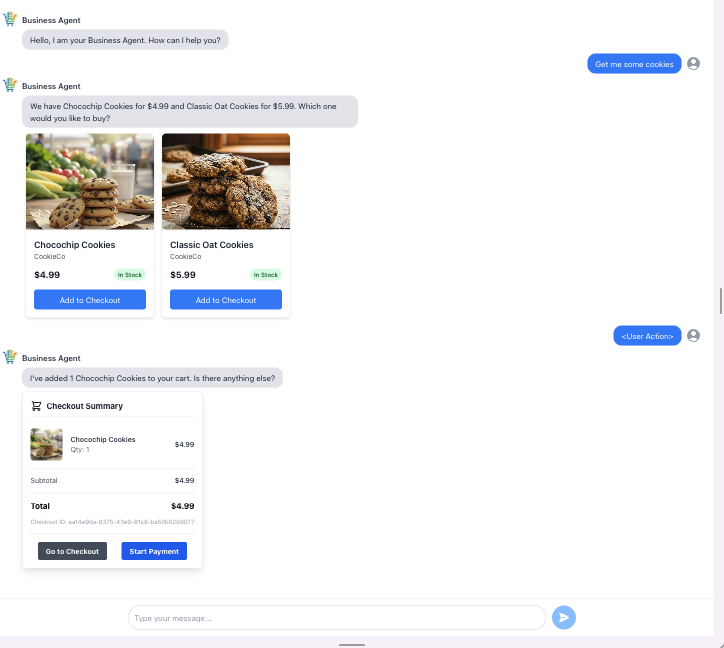
Maybe the most important part of the example’s code is the agent definition:
1
2
3
4
5
6
7
8
9
10
11
12
13
14
15
16
17
18
19
20
21
22
23
24
25
26
27
28
29
30
31
32
root_agent = Agent(
    name="shopper_agent",
    model="gemini-2.5-flash",
    description="Agent to help with shopping",
    instruction=(
        "You are a helpful agent who can help user with shopping actions such"
        " as searching the catalog, add to checkout session, complete checkout"
        " and handle order placed event.Given the user ask, plan ahead and"
        " invoke the tools available to complete the user's ask. Always make"
        " sure you have completed all aspects of the user's ask. If the user"
        " says add to my list or remove from the list, add or remove from the"
        " cart, add the product or remove the product from the checkout"
        " session. If the user asks to add any items to the checkout session,"
        " search for the products and then add the matching products to"
        " checkout session.If the user asks to replace products,"
        " use remove_from_checkout and add_to_checkout tools to replace the"
        " products to match the user request"
    ),
    tools=[
        search_shopping_catalog,
        add_to_checkout,
        remove_from_checkout,
        update_checkout,
        get_checkout,
        start_payment,
        update_customer_details,
        complete_checkout,
    ],
    after_tool_callback=after_tool_modifier,
    after_agent_callback=modify_output_after_agent,
)
Here’s the implementation of the search tool:
1
2
3
4
5
6
7
8
9
10
11
12
13
14
15
16
17
18
    all_products = list(self._products.values())

    matching_products = {}

    keywords = query.lower().split()
    for keyword in keywords:
      for product in all_products:
        if product.product_id not in matching_products and (
            keyword in product.name.lower()
            or (product.category and keyword in product.category.lower())
        ):
          matching_products[product.product_id] = product

    product_list = list(matching_products.values())
    if not product_list:
      return ProductResults(results=[], content="No products found")

    return ProductResults(results=product_list)
The example uses Google’s ADK framework. As we can see, the agent responsible for assisting the user with their shopping (aka the Platform) is simply an agent that has access to relevant tools. Much like a coding agent is an LLM with edit, read, and list files tools, a shopping agent is an LLM with search catalog, checkout actions, and payment tools.
The example’s implementation of the search tool is rather simple: iterate over the products list and search by keyword. This is for demo purposes only. But that’s where the actual complexity of this whole thing lies — and that’s what Google brings to the table: discoverability and search prowess.
The other major thing it brings is, of course, the “Surface”. The security of payment and trust complete this trifecta.
So, OpenAI has already introduced ACP. Google followed suite with UCP. Is the future of commerce really agentic? TBD.