Building A Coding Agent (Provider-agnostic)
A Provider-Agnostic Coding Agent built using Python and Litellm
Building a Coding Agent from Scratch
Agents like Cloud Code or Codeex have been everywhere lately. Even Linus — the final boss of programming — has posted about his latest vibe coding session.
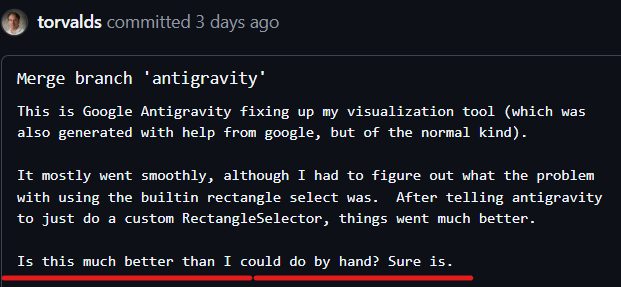
So yeah, agents might be here to stay.
The best way to learn about agents is to understand how they’re built. As Richard Feynman put it:
“What I cannot create, I do not understand.”
These agents are powerful, but they’re not magic. The core idea is simple — and in this post, we’ll build a working example step by step.
Final result Demo
Code can be found on Github/
1
2
3
4
5
6
7
8
9
10
11
12
13
14
15
16
17
18
19
20
>
> uv run python agent.py
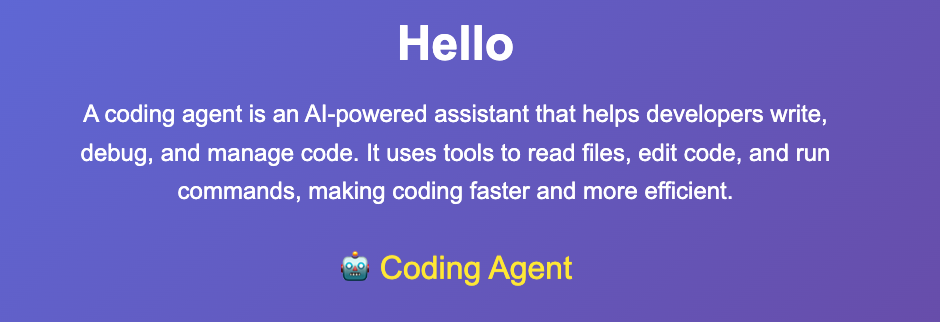
> create a hello.html that explains briefly what a coding agent is. It should have a nice animation.

🔧 Creating file: hello.html
✅ File created successfully
Assistant: I've successfully created the `hello.html` file. It includes a brief explanation of what a coding agent is (an AI-powered assistant that helps with coding tasks using tools like file reading, editing, and more), along with a nice animation: the title and text fade in smoothly, and there's a bouncing robot emoji to add some fun visual appeal. You can open this HTML file in any web browser to view it. If you'd like any modifications, let me know!
You: add a an input field and a button to calculate fibonacci sequence
🔄 Executing 1 tool...
  1. 🔧 read_file(filename=hello.html)
🔧 Reading file: hello.html
🔄 Executing 1 tool...
  1. 🔧 edit_file(path=hello.html, old_str=    </style>
</head>
<body>
    <div class="container">
        <h1>Hello</h1>
        <p>A coding agent is an AI-powered assistant that helps developers write, debug, and manage code. It uses tools to read files, edit code, and run commands, making coding faster and more efficient.</p>
        <div class="animation">
...
The generated file looks pretty good!
LLMs Don’t Execute Anything (They Just Generate Text)
LLMs are black boxes that generate text. So how can they “do things” like reading and editing files?
One trick is providing the LLM with a list of tool definitions.
A tool definition looks like this:
- tool name (function name)
- description of the tool
- parameters
For example, imagine we have a get_weather tool that takes a place and responds with the weather.
When we call the LLM, we provide a list of functions/tools in the request context.
If I ask the LLM: “Give me the weather in Paris”, it will:
- pick the
get_weathertool - output structured data (basically JSON) containing the parameters required for that tool
So the LLM might output something like:
- tool:
get_weather - arguments:
{ "place": "Paris" }
What Tool Calling Actually Is
OpenAI docs provide a good explanation:
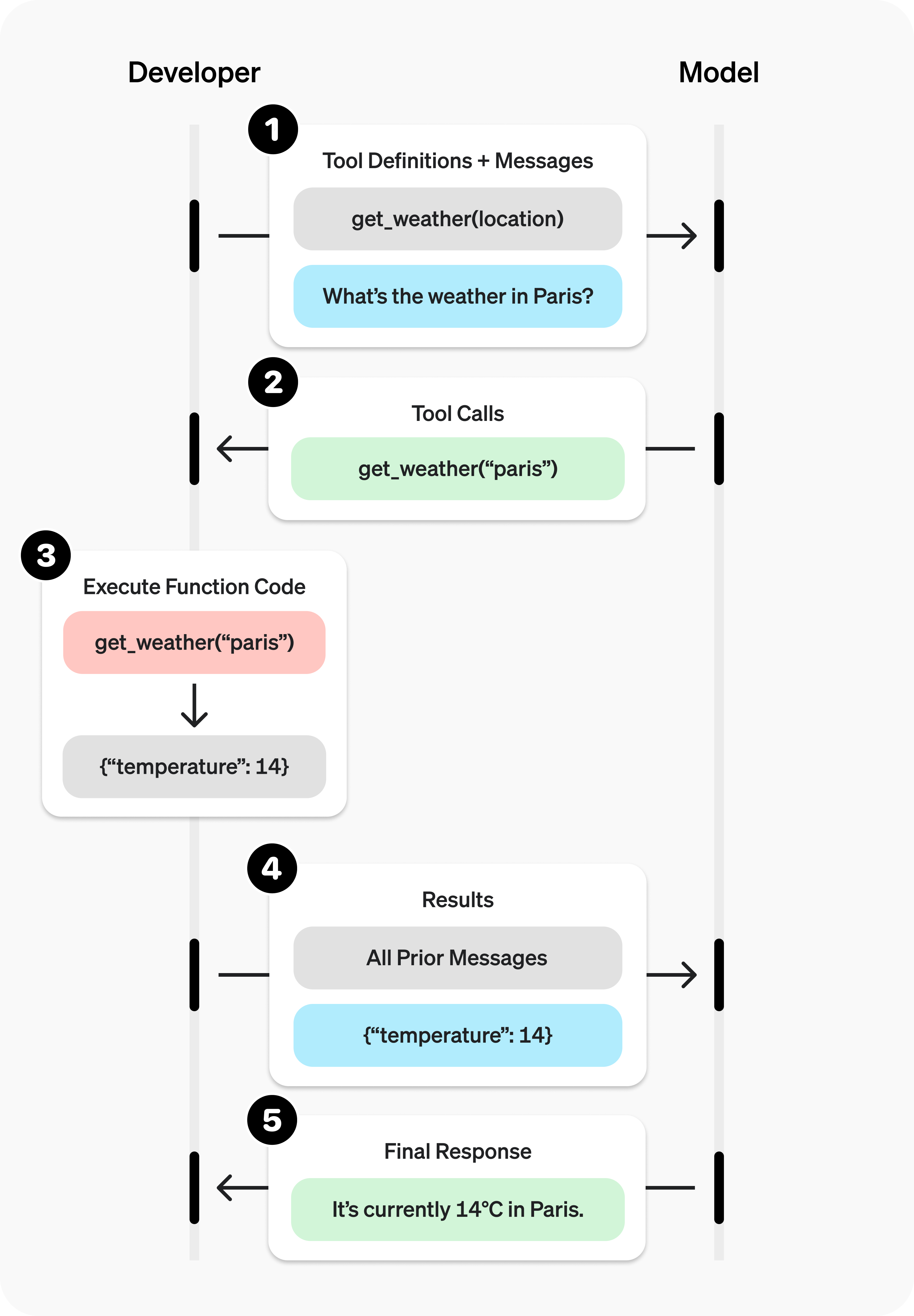
The key idea is:
- The LLM does not execute the tool call
- It only outputs which tool to call + the parameters
- Your program executes the tool and returns the result back into the context
So what happens is:
- LLM outputs tool call
- your program runs the tool
- tool output is added into the conversation
- LLM continues with the new information
From Tool Calling to a Coding Agent
Now imagine instead of calling a weather tool, we give the LLM tools like:
- list files
- read files
- edit files
- run bash commands
- run web search
LLMs are trained on a lot of code and they can generate a lot of it (not always of great quality, though). So if we give them access to a tool that can modify files, and they call that tool with relevant code, they can actually change the file.
This is exactly how coding agents work.
Coding Agent Architecture
Here’s the architecture:
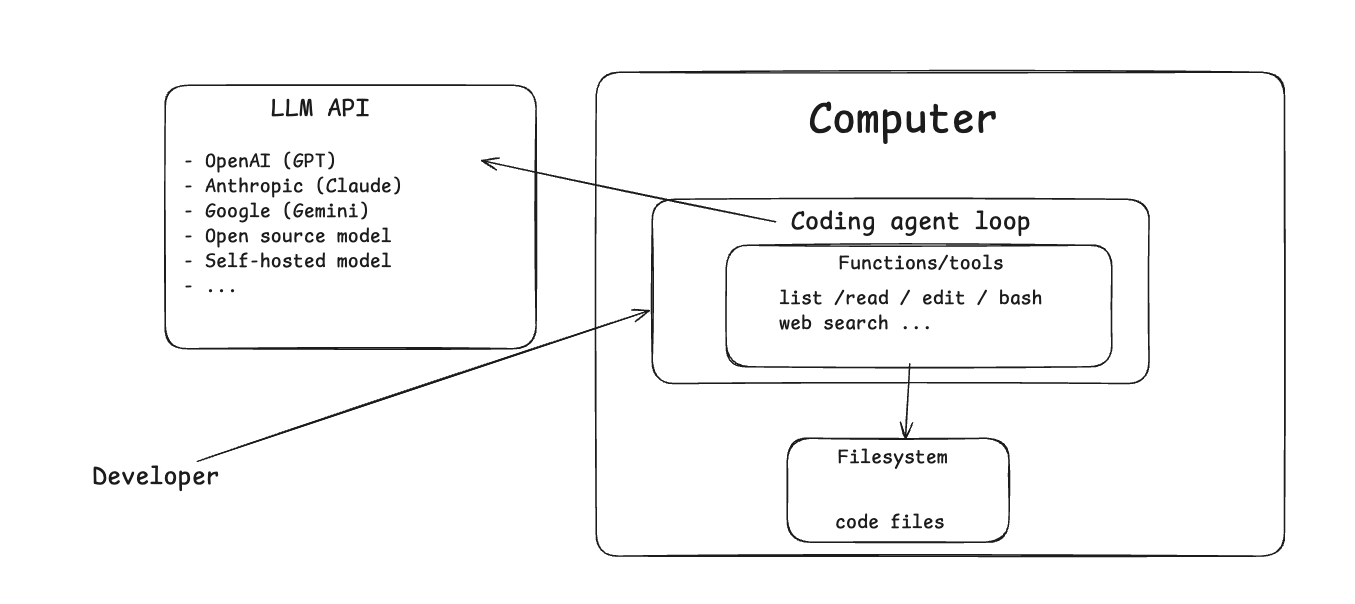
- You have your machine
- It runs a coding agent program
That program is basically a loop that:
- sends a request to an LLM
- gets a response
- executes tool calls (if any)
- adds tool results back into the conversation context
- calls the LLM again
So coding agents are basically a feedback loop:
LLM → tools → results → LLM → tools → results → …
And as agents get more capable, they get more tools.
As an aside, MCP servers are simply tools that execute functions on remote servers.
So instead of tools running locally, MCP allows the LLM to execute tools it can discover via the MCP protocol — and those tools run somewhere remote.
And those tools can interact with:
- file systems
- local resources
- remote resources
How the Request Flow Works
Here’s the full workflow:
The developer asks the LLM to create a file (like an HTML page or Python script)
This request is sent to the LLM API, and in that request we include the list of tools
Tools are defined with:
- function name
- description
- parameters
The LLM responds
If the response includes a tool call like
read_fileoredit_file:- the coding agent executes it
- the result is added back to the LLM context
Now if there’s an error (like the file doesn’t exist) the error gets added to the context too.
Then the LLM sees something is wrong and changes course.
If it succeeds, it’s like:
“Okay, I was able to edit the file.”
Then it tells the user the request has been completed and asks if anything else is needed.
Let’s Look at the Code
Let’s actually look at the code.
All the agent is is an infinite loop inside a function — the agent loop.
First, we have the following system prompt:
1
2
3
4
5
SYSTEM_PROMPT = """
You are a coding assistant whose goal it is to help us solve coding tasks.
You have access to tools for reading files, listing directories, and editing files.
Use these tools when needed to help with coding tasks.
"""
Then a infinite loop that’s the heart and soul of the agent:
1
2
3
4
5
6
7
8
9
10
11
12
13
14
15
16
17
18
19
20
21
22
23
24
25
26
27
28
29
30
31
32
33
34
35
36
37
38
39
40
41
42
43
44
45
46
47
48
49
50
51
52
53
54
55
56
57
58
59
60
61
62
63
64
65
66
67
68
69
70
71
72
73
74
75
76
77
78
79
80
81
82
83
84
85
86
    while True:
        try:
            user_input = input(f"{YOU_COLOR}You:{RESET_COLOR} ")
        except (KeyboardInterrupt, EOFError):
            print(f"\n{INFO_COLOR}Goodbye! 👋{RESET_COLOR}")
            break

        conversation.append({"role": "user", "content": user_input.strip()})

        # Show thinking indicator
        print(f"{THINKING_ICON} Assistant is thinking...", end="\r")

        while True:
            response = llm_completion(conversation)
            # Handle error responses
            if isinstance(response, str):
                print(f"{ASSISTANT_COLOR}Assistant:{RESET_COLOR} {response}")
                break
            try:
                # Get the assistant's message - handle different response formats
                if hasattr(response, 'choices') and response.choices:
                    assistant_message = response.choices[0].message
                    content = getattr(assistant_message, 'content', '') or ""

                    # Check if there are tool calls
                    tool_calls = getattr(assistant_message, 'tool_calls', None) or []

                    if not tool_calls:
                        # No tool calls, just print the response
                        if content.strip():
                            print(f"{ASSISTANT_COLOR}Assistant:{RESET_COLOR} {content}")
                        conversation.append({"role": "assistant", "content": content})
                        break

                    # Show assistant's initial response if any
                    if content.strip():
                        print(f"{ASSISTANT_COLOR}Assistant:{RESET_COLOR} {content}")

                    # Handle tool calls with better formatting
                    conversation.append({
                        "role": "assistant",
                        "content": content,
                        "tool_calls": tool_calls
                    })

                    print(f"{TOOL_COLOR}🔄 Executing {len(tool_calls)} tool{'s' if len(tool_calls) > 1 else ''}...{RESET_COLOR}")

                    for i, tool_call in enumerate(tool_calls, 1):
                        tool_name = tool_call.function.name
                        tool_args = json.loads(tool_call.function.arguments)

                        # Format tool call display
                        args_display = ", ".join(f"{k}={v}" for k, v in tool_args.items())
                        print(f"  {i}. {TOOL_ICON} {tool_name}({args_display})")

                        tool = TOOL_REGISTRY.get(tool_name)
                        if not tool:
                            error_msg = f"Unknown tool: {tool_name}"
                            print(f"     {ERROR_COLOR}{ERROR_ICON} {error_msg}{RESET_COLOR}")
                            conversation.append({
                                "role": "tool",
                                "tool_call_id": tool_call.id,
                                "content": json.dumps({"error": error_msg})
                            })
                            continue

                        try:
                            resp = tool(**tool_args)
                            conversation.append({
                                "role": "tool",
                                "tool_call_id": tool_call.id,
                                "content": json.dumps(resp)
                            })
                        except Exception as e:
                            ...
                else:
                    # Fallback for unexpected response format
                    content = str(response)
                    print(f"{ASSISTANT_COLOR}Assistant:{RESET_COLOR} {content}")
                    conversation.append({"role": "assistant", "content": content})
                    break

            except Exception as e:
                ...
- ask the user for input
- add it to the conversation
- perform an LLM completion (calling the LLM API)
- Add LLM response to the conversation
- Execute tools the LLM asked for and add the results to the conversation
- Rinse, repeat
The LLM Call Has Nothing Special… Except Tools
1
2
3
4
5
6
7
8
9
10
11
12
13
14
15
16
17
18
19
20
21
22
23
24
25
26
27
28
29
30
31
32
33
34
35
36
def llm_completion(conversation: List[Dict[str, str]]):
    # Prepare messages for litellm
    messages = []
    for msg in conversation:
        if msg["role"] == "system":
            messages.append({"role": "system", "content": msg["content"]})
        else:
            messages.append(msg)

    # Use litellm for provider-agnostic LLM calls
    model = os.environ["MODEL"]
    api_key = os.environ["API_KEY"]

    # Build kwargs for litellm
    kwargs = {
        "model": model,
        "api_key": api_key,
        "messages": messages,
        "max_tokens": 2000,
        "temperature": 0.1,
        "tools": TOOLS,
    }

    # Add api_base if available
    if llm_config.get("api_base"):
        kwargs["api_base"] = llm_config["api_base"]

    try:
        response = litellm.completion(**kwargs)
        return response
    except Exception as e:
        error_msg = f"LLM call failed: {str(e)}"
        print(f"{ERROR_COLOR}{ERROR_ICON} {error_msg}{RESET_COLOR}")
        print(f"{INFO_COLOR}Make sure you have set up your API keys in the .env file{RESET_COLOR}")
        print(f"{INFO_COLOR}Current model: {model}{RESET_COLOR}")
        return f"I encountered an error: {error_msg}. Please check your API key configuration."
I’m using LiteLLM, it’s a provider-agnostic LLM library.
The call includes model, API key, messages (the conversation) and tools (most important part)
The conversation is just the list of messages:
- user messages
- assistant messages
- tool outputs
Tool Definitions: Read, List, Edit
The tools are defined like this:
1
2
3
4
5
6
7
8
9
10
11
12
13
14
15
16
17
18
19
20
21
22
23
24
25
26
27
28
29
30
31
32
33
34
35
36
37
38
39
40
41
42
43
44
45
46
47
48
49
50
51
52
53
54
55
56
57
58
59
60
61
TOOLS = [
    {
        "type": "function",
        "function": {
            "name": "read_file",
            "description": "Gets the full content of a file provided by the user.",
            "parameters": {
                "type": "object",
                "properties": {
                    "filename": {
                        "type": "string",
                        "description": "The name of the file to read."
                    }
                },
                "required": ["filename"]
            }
        }
    },
    {
        "type": "function",
        "function": {
            "name": "list_files",
            "description": "Lists the files in a directory provided by the user.",
            "parameters": {
                "type": "object",
                "properties": {
                    "path": {
                        "type": "string",
                        "description": "The path to a directory to list files from."
                    }
                },
                "required": ["path"]
            }
        }
    },
    {
        "type": "function",
        "function": {
            "name": "edit_file",
            "description": "Replaces first occurrence of old_str with new_str in file. If old_str is empty, create/overwrite file with new_str.",
            "parameters": {
                "type": "object",
                "properties": {
                    "path": {
                        "type": "string",
                        "description": "The path to the file to edit."
                    },
                    "old_str": {
                        "type": "string",
                        "description": "The string to replace."
                    },
                    "new_str": {
                        "type": "string",
                        "description": "The string to replace with."
                    }
                },
                "required": ["path", "old_str", "new_str"]
            }
        }
    }
]
Read tool: Gets the full content of a file.
List files tool: Lists files in a directory.
Edit file tool: This one works like a replace function. When you want to edit a file, you provide the old string and the new string to replace it with. If the old string is empty, we create or overwrite a file. If it’s not empty, we replace old string with new string
Production grade agents have way more elaborate functions, but this is good enough for our example.
Error Messages Matter
One thing I want to bring attention to: it’s very important to add expressive error messages to tool outputs.
For example, if the LLM tries to edit a file but the old string doesn’t exist, we return an error like “Old string was not found”. Then the LLM adjusts accordingly.
This happens all the time in practice:
- LLM calls a tool
- tool execution returns an error
- LLM adjusts arguments
- repeat until success
Tool Registry: Where the Magic Actually Happens
1
2
3
4
5
6
TOOL_REGISTRY = {
    "read_file": read_file_tool,
    "list_files": list_files_tool,
    "edit_file": edit_file_tool,
}
When the LLM emits a tool call, we extract: function name + arguments
Then we have a tool registry mapping tool names to actual functions.
Example:
- LLM outputs
read_file({"filename":"index.html"}) - we map
"read_file"→ actualread_file_tool()function
Then:
- if we don’t find that tool, we tell the LLM it called an unknown tool
- otherwise we execute the tool with the parsed arguments
- we add the tool output back to the conversation
The Loop Continues Forever
Once the loop finishes:
- we go back to the start
- ask the user again
That’s it.
User input → LLM call (with tools + context) → tool calls → tool results → repeat
Let’s Not Oversimplify
Let’s not oversimplify things. What we just explained is the simplest possible case. In production-grade agents you need:
- better error handling
- LSP (language server protocol support)
- multiple sessions
- search
- more elaborate tools
There’s a lot to it. But the core idea is exactly what we described:
Give the LLM access to tools that run on your local environment and interact with your files and resources.