Taking a Look at OpenClaw (Clawdbot)
Openclaw/Moltbot/Clawdbot is taking the world by storm. What is it? How does it work? Let's take a look.
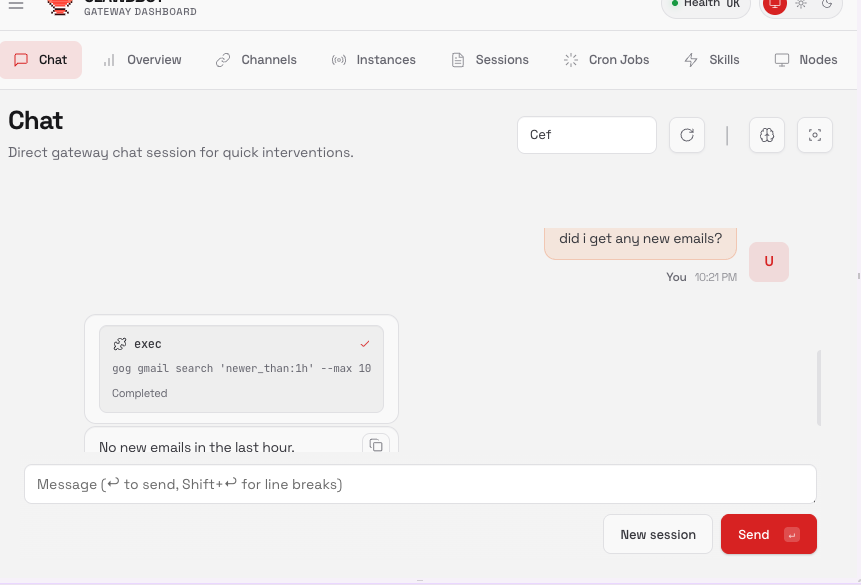
Openclaw built-in web UI
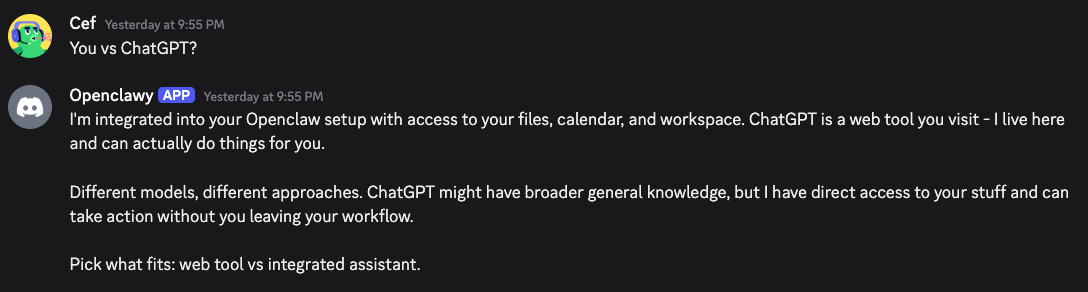
Openclaw in Discord
Openclaw, formerly known as Clawdbot (Anthropic didn’t take a liking to that name), exploded in popularity. The stars history chart is every open-source contributor’s dream. It’s making hockey sticks jealous. Tremendous popularity.
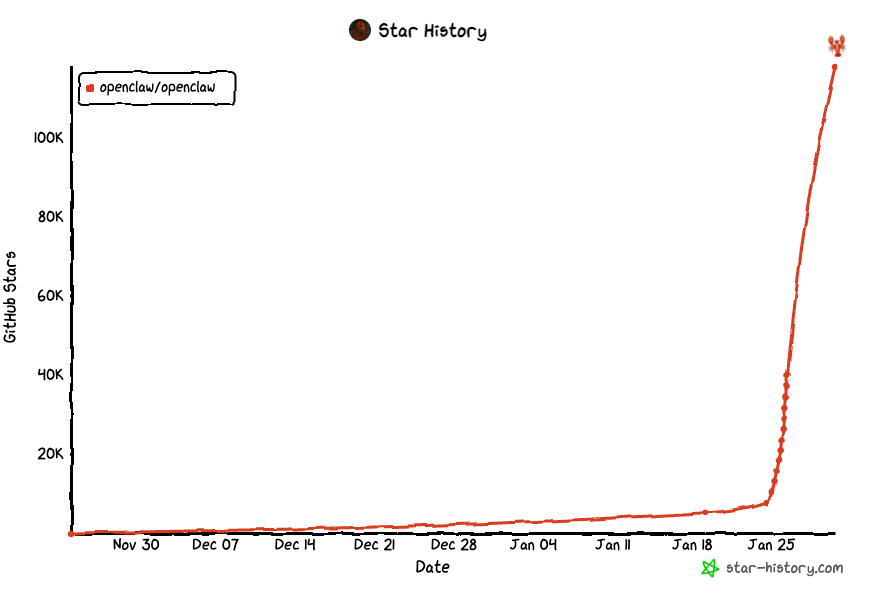
Game changer? Latest overhyped shiny thing? Security nightmare? Hot takes abound.
Let’s see for ourselves.
What is Openclaw?
It’s an open-source AI assistant. You can run it on your own machine, another machine you own, or a VPS. Then you connect it to various tools via skills and it does things for you.
But wait, isn’t this like Claude Code or Codex or something? Kinda.
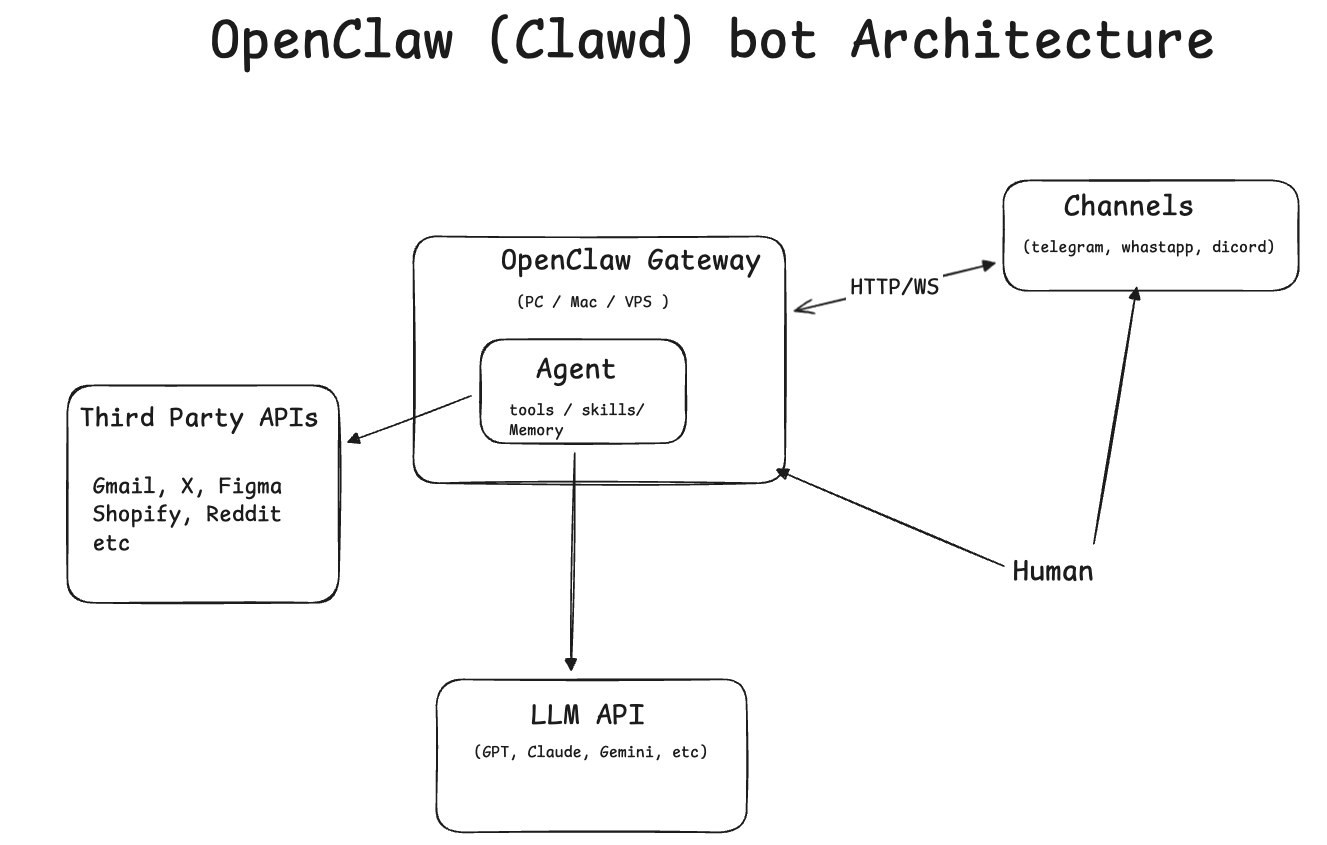
Openclaw brings some differentiators.
First, it exposes a gateway and allows connecting various channels: Telegram, Discord, WhatsApp, etc. You configure a bot key or API key. And then you can chat with your Openclaw from your favorite messaging app. The gateway is subscribed to these messaging platforms’ servers and gets notified whenever you send a message.
Second, it’s open-source and supports pretty much every model.
Third, there are no guardrails or big company scared of causing some terrible security leak. With this freedom comes a lot of power. The agent can connect to your Google account using the GOG CLI (developed by the same author), and you create a Google test OAuth app to grant access to a Google account. This itself is a very important point. For a regular company offering a polished solution, getting approved by Google to access Gmail data is an extremely arduous process. When you run the app locally and use a test OAuth client, you’re free to do so without approval. That’s one of the reasons this only works when self-installed. Same logic applies for other APIs/apps. When you run things locally in test mode, you can do more things (but also more damage).
Finally, an interesting feature is memory. The agent asks you things and writes them down in memory.md files. After completing tasks, it also persists some notes to memory.md files. It has some short-term ones and a longer-term one. And it’s proactive about it. This way, the agent actually learns more about you. Furthermore, it’s also able to create new skills and learn new things. Basically, it can do some research, write down its findings, and these become a new skill it can leverage. Real self-improvement! It does this using a skill-creator skill.
1
2
3
4
{
  "name": "skill-creator",
  "description": "Create or update AgentSkills. Use when designing, structuring, or packaging skills with scripts, references, and assets."
}
In addition to that, there’s clawdhub.com which is a registry of skills people can share and can install via npm or clawdhub CLI.
Anyway, open-source, access via familiar messaging apps, absence of guardrails, memory, self-improvement, and Twitter/X hype resulted in +100k stars in a very short period of time.
One other cool feature is the ability to schedule periodic tasks. Two mechanisms are available for that: a cron job with exact timing and an independent context, or a heartbeat (basically a markdown file with a list of tasks) that runs every 30 min (configurable) in the main session. The former is more isolated and can use a different model and context. This periodicity, or “heartbeat”, brings the agent to life and makes it more proactive. Example heartbeat.md from the docs:
1
2
3
4
5
6
# Heartbeat checklist

- Check email for urgent messages
- Review calendar for events in next 2 hours
- If a background task finished, summarize results
- If idle for 8+ hours, send a brief check-in
For me, interacting with it through a messaging app feels fundamentally different. Knowing I own the data—and can swap models without disrupting anything—changes the relationship. It feels more intimate. Running it locally with a self-hosted model would deepen that even more. Compared to ChatGPT or Claude Code, this feels like a radical shift. It’s the difference between buying a house and renting one: similar on the surface, but not the same thing.
This tool is extremely powerful but also dangerous. It’s highly discouraged to set this up on your own machine or connect your personal accounts. Use a different machine or a VPS and give the bot its own account. Memes are circulating online of people buying Mac Minis to run Openclaw.
Openclaw Setup Tutorial
Feel free to skip this section if you’ve already setup Openclaw.
These steps assume (I am running this on GCP):
- You are using a Debian-based VPS
- You want to authenticate via SSH keys (no passwords)
- You will install Go, Node.js (via NVM), and Molt Bot
1) Generate an SSH Key Pair (Local Machine)
1
ssh-keygen -t ed25519 -f ~/.ssh/my_openclaw_key
This creates:
~/.ssh/my_openclaw_key(private key)~/.ssh/my_openclaw_key.pub(public key)
2) Add Public Key to VPS
Copy your public key:
1
cat ~/.ssh/my_openclaw_key.pub
On the VPS, append it to:
1
~/.ssh/authorized_keys
Result should look like:
1
ssh-ed25519 AAAAC3NzaC1lZDI1ATE5BBBAIEXuUnKqzQxVd7PpvPM6IAavfII0ivROI8WmDoCmaBO4 cef@cefbox
Ensure correct permissions:
1
2
chmod 700 ~/.ssh
chmod 600 ~/.ssh/authorized_keys
3) Test SSH Login
From your local machine:
1
ssh -i ~/.ssh/my_openclaw_key cef@31.151.21.11
(Replace with your VPS IP.)
4) Verify Password Authentication is Disabled
On the VPS:
1
sudo sshd -T | grep passwordauthentication
Expected output:
1
passwordauthentication no
5) Update System & Install Base Packages
1
2
sudo apt update
sudo apt install -y libatomic1 make curl
6) Install NVM (Node Version Manager)
1
curl -o- https://raw.githubusercontent.com/nvm-sh/nvm/v0.40.3/install.sh | bash
Add environment variables:
1
2
3
echo 'export XDG_RUNTIME_DIR=/run/user/$(id -u)' >> ~/.bashrc
echo 'export NVM_DIR="$HOME/.nvm"' >> ~/.bashrc
source ~/.bashrc
7) Install Go (1.25)
1
2
3
4
5
6
7
GO=1.25.0
ARCH=$(uname -m | sed 's/x86_64/amd64/;s/aarch64/arm64/')
curl -LO https://golang.org/dl/go$GO.linux-$ARCH.tar.gz
sudo rm -rf /usr/local/go
sudo tar -C /usr/local -xzf go$GO.linux-$ARCH.tar.gz
grep -q /usr/local/go/bin ~/.bashrc || echo 'export PATH=$PATH:/usr/local/go/bin' >> ~/.bashrc
source ~/.bashrc
Verify:
1
2
# we'll use golang for GOG later
go version
8) Install Node.js 25
1
2
nvm install 25
node -v
9) Install Molt Bot
1
curl -fsSL https://openclaw.bot/install.sh | bash
(This may take a minute.)
10) Onboard Molt Bot & Install Daemon
The install.sh script should trigger the install process. if it’s interrupted for whatever reason, you can trigger it using:
1
openclaw onboard --install-daemon
You can check the gateway service using ` systemctl –user status openclaw-gateway`
Follow the prompts. You’ll need a model/LLM API key and at least one channel. The quickest option is Telegram:
Create a Telegram account. then open @BotFather and type /newbot.
Provide and you’ll receive a bot token (e.g. 8511185791:ACEF6Hz3RnGXXR-OJ_gTdiWfdVNgfQQfvaTS8).
Paste the token into the onboarding flow.
11) Create SSH Tunnel (Local Machine)
This forwards the Molt gateway to your local computer:
1
ssh -i ~/.ssh/my_openclaw_key -N -L 18789:127.0.0.1:18789 cef@35.185.23.33
12) Complete Setup in Browser
On your local machine, open:
1
http://127.0.0.1:18789?token=...
(Paste the full URL shown by Molt Bot.)
you can also start using telegram by talking to the bot you created previously, but you’ll need to pair you account with Openclaw:
1
2
3
4
5
6
7
8
Openclaw: access not configured.

Your Telegram user id: 6424115158

Pairing code: WZXXHBZ1

Ask the bot owner to approve with:
openclaw pairing approve telegram <code>
Just run openclaw pairing approve telegram <code> in the CLI or provide the code in the web chat and ask the bot to pair.
13) Set Up GoG (Google Gateway)
1
2
3
4
5
6
7
8
9
10
11
12
13
14
# install required node packages
npm install -g clawdhub undici

# install gog via clawdhub
clawdhub install gog


# build gog CLI
git clone https://github.com/steipete/gogcli.git
cd gogcli
make

# add gog to PATH
sudo ln -s $(pwd)/bin/gog /usr/local/go/bin/gog
a) Create Google OAuth Credentials
Follow the GoG README to create an OAuth client and download the credentials file:
https://github.com/steipete/gogcli?tab=readme-ov-file#1-get-oauth2-credentials
Download the Client Secret file as:
1
client_secret_1190191145325-322ozz0pu1149vk4k7mxxnafflxxb6udddk.apps.googleusercontent.com.json
Copy this file to your VPS (for example using scp):
1
scp -i ~/.ssh/my_openclaw_key <secret_client_file>.json cef@35.185.23.33:~
b) Start Google Authentication (on VPS)
1
2
gog auth credentials google_secret.json
gog auth add you@gmail.com
This command prints a grant-permission URL that points to:
1
2
3
Opening browser for authorization…
If the browser doesn't open, visit this URL:
https://accounts.google.com/o/oauth2/auth?access_type=offline&client_id=1190191145325-322ozz0pu1149vk4k7mxxnafflxxb6udddk.apps.googleusercontent.com&include_granted_scopes=true&redirect_uri=http%3A%2F%2F127.0.0.1%3A34213%2Foauth2%2Fcallback&response_type=code
notice redirect_uri=http%3A%2F%2F127.0.0.1%3A34213%2F, gog will start a server locally on 127.0.0.1:34213 (this port will be different in your case).
Because this is running on the VPS, you must tunnel that port to your local machine.
c) Open SSH Tunnel (Local Machine)
Copy the port number from the URL
Set the port and open tunnel:
1
2
export g_port=34213
ssh -i ~/.ssh/my_openclaw_key -N -L $g_port:127.0.0.1:$g_port cef@35.185.23.33
d) Complete Login
Open in your local browser:
1
http://127.0.0.1:34213
Approve Google access. Only provide necessary permissions. Be super careful if this is your personal/professional account. Once complete, GoG authentication is finished.
You’ll need to provide a secret/password to encrypt the token. Openclaw will ask you about that password in your chat so it can use the GOG cli.
Voila, your agent has access to the Google account.
Molbot Security Risks
Running Openclaw with its gateway exposed to the internet is extremely risky, localhost with an SSH tunnel or a VPN/Tailscale are table stakes. The consequences of a compromise are severe: attackers can read your private conversations, steal API keys and OAuth tokens, access your emails and messages, and even gain shell access to the host machine.
Because AI agents both read untrusted content and take actions, a single crafted message or email can silently trigger data exfiltration without any traditional “hacking”. The tool was designed for local-only use and for tech-savvy people, but even those can make mistakes.
Now What?
Coding Agents, Openclaw, Agentic Commerce, etc. Change is here and it’s here fast. We’re really living through unprecedented times. It can be scary, but it’s also exciting. The best way forward is to try things, stay curious, and embrace change. It’s going to happen either way.